
Coding & makerspace technology
Get your pupils excited about this complex topic in a playful way: e.g. with LEGO WeDo or the Tüftelakademie's mobile makerspace.
3D printer
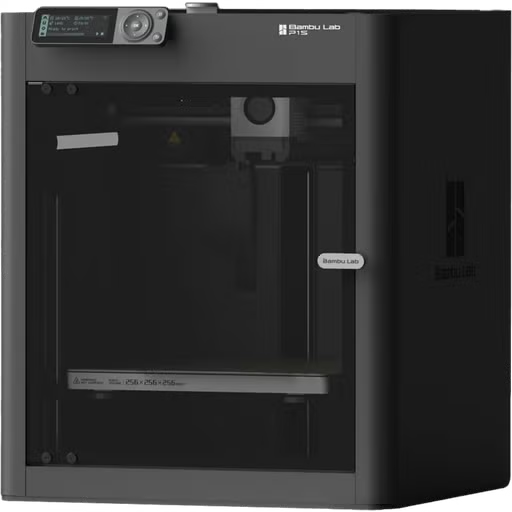
With the TinkerToys or TinkerCAD software, your students can learn how to design 3D objects without any prior knowledge. They build their objects using various basic shapes and can then have them printed, much like printing on paper. Two printers are available for you to borrow. We’d be happy to provide a brief tutorial when you check out the equipment, or you can stop by in advance and try it out for yourself.
| Number Available | Accessories |
| 2 | Bambu P1S |
Mobile makerspace
With the mobile makerspace, you can implement projects with your pupils on sustainable urban development, the periodic table of elements and many other exciting topics. This promotes an understanding of digital tools and raises pupils' awareness of sustainability. The individual boxes contain the necessary teaching materials and instructions.

Periodic table of the elements (MakeyMakey)
Your pupils research how an element from the periodic table of elements relates to their lives and then prepare their research results with the help of Makey Makey. The result is a large interactive periodic table that plays the pupils' information when touched.
- To the lesson series "Interactive periodic table" (opens in a new tab)
- Introduction to the world of digital tools
- from secondary level 1

Virtual textile factory (CoSpaces)
Your pupils research the globalized textile industry. Topics such as working conditions, resource consumption and production processes are explored. The research results are visualized and presented in a three-dimensional, virtual space using the CoSpaces program.
- To the "Virtual textile factory" (opens in a new tab) series of lessons
- Creative introduction to the world of digital tools
- from secondary level 1

Sustainable urban development (Ozobot)
Your pupils use creative techniques to develop proposals for a sustainable urban district. With the help of the Ozobot robots, they take on the perspective of different fictitious city dwellers and thus develop an understanding of their needs in a city. Finally, the pupils design an Ozobot trail through their district of the future.
- To the lesson series "Sustainable urban development" (opens in a new tab)
- Creative introduction to the world of digital tools
- from secondary level 1

Sense Your School Box (senseBox & Calliope mini)
Your students build an intervention at their school with the aim of influencing the behavior of others and making their school an environmentally friendly and health-promoting place.
- About the "Sense Your School" (opens in a new tab) lesson series
Creative introduction to the world of digital tools
from secondary level 1

Supplement for Plastic No Thanks: Touch Board Box (Touch Board)
Your pupils investigate in which everyday situations plastic waste is caused and develop ideas for less plastic consumption. To do this, they collect data in their environment through interviews and observations. They then visualize their findings in an Ozobot decision tree and with the help of touch boards.
- About the lesson series "Plastic no thanks"
- Creative introduction to the world of digital tools
- from secondary level 1
| Quantity | Description | Suitable for |
| 2x each | Box Periodic Table of Elements (MakeyMakey), Box Virtual Textile Factory (CoSpaces), Box Sustainable Urban Development (Ozobot), Sense Your School Box (senseBox & Calliope mini), Supplement for Plastic No Thanks: Touch Board Box (Touch Board) | from sec. 1, two pupils at the same time |
LEGO® Education SPIKE™ Essential

LEGO® Education SPIKE™ Essential gives students an introduction to STEM learning concepts and encourages them to develop their language, math, and social-emotional skills while creating small research projects with their own hands. It follows a step-by-step approach to introduce students to programming and smart hardware. It can be used throughout elementary school. The learning units are aligned with the curriculum for grades 1 and 2 and grades 3 and 4, respectively, and address topics from everyday life. Students learn to solve problems and develop solutions using creativity, logic, and teamwork.
Lego Education provides extensive resources for teachers to help them integrate and implement the learning units effectively in the classroom. During the units, students work with the corresponding app. The learning units are easy to get started with and are also sorted by difficulty level and grade.
If your school does not have access to tablets or PCs, you can also reserve individual iPads or an iPad case from our rental service (if available).
Note: In addition, several classroom sets are available for long-term rental for half a year or a full year. If you are interested, you will find a link to apply below.
LEGO® SPIKE™ Prime

LEGO’s new hands-on learning concept is designed for STEM education in grades 5–8. Through a child-friendly programming language and easy-to-use hardware, it helps your students think critically and solve complex problems.
LEGO Education provides ready-made learning content. By clicking the "Go to Learning Units" link below, you can sort by product and view a list of the various learning units with individual tasks. Students are best served using iPads with the corresponding app.
If your school does not have access to tablets or PCs, you can also reserve individual iPads or an iPad case from our rental service (if available).
The kits can be rented individually or as a class set.
| Quantity | Description | Suitable for |
| 10 | LEGO Education Spike Prime | Grades 5–8, two students at a time |
c
Blue-Bot class set

The Blue-Bot class set consists of six Blue-Bots including charging station. The Blue-Bot can be used as an easy introduction to programming in elementary school. It is either operated using the 7 buttons on the back or the routes are programmed in an app. The Blue-Bot can move forwards and backwards, turn in circles, make 90 degree angles and even talk!
You are welcome to test the Blue-Bot before borrowing it from the media center. In addition to the Blue-Bots, you can also borrow floor mats (see photo) to drive on. We currently have these in a treasure island look and two transparent mats, which can be individually equipped and thus also contain lesson-specific content.
| Quantity | Description | Suitable for |
| 2 | Class set of Blue Bots | from 1st class |
DJI RoboMaster TT drone

The RoboMaster TT was developed for practical use in computer science lessons. Your pupils will learn the Scratch, Python or Swift programming languages with ease.
A whole class set of 16 drones is available, each with two batteries and other accessories. We recommend iPads for control.
You are welcome to test the drone in the media center before borrowing it.
| Quantity | Designation | Suitable for |
| 16 | DJI RoboMaster TT Tello Talent | from 4th grade, two pupils at the same time |
Calliope Mini

The Calliope mini is ideal for getting started with programming, development, and prototyping. Its ease of use and visual programming make it accessible to everyone, especially children and young people.
The provider offers extensive accompanying materials, including workbooks with exercises and teaching materials for elementary and middle school.
Sensebox

The senseBox:edu is a compact electronics kit with various sensors, for example for temperature, humidity, and many other environmental measurements. It is suitable for getting started in programming and working with microcontrollers.
The package includes learning cards that guide students step by step through their first experiments and programming tasks. Programming can be done either with the block-based programming language "Blockly" or—for advanced users—text-based, for example, using the Arduino IDE.
Ozobot

The Ozobot is a small programmable robot that reacts to color codes and performs various movements and maneuvers. These color codes or lines can either be drawn with the pens included in the set or laid out with additional magnetic cards or a wooden puzzle.
Ozobots are ideal for introducing children to the world of robotics and programming. Their playful approach clearly conveys basic concepts such as sequences, logic, and problem solving.
Matatalab Coding Set

The Matatalab Coding Set consists of a learning robot, a control tower, a learning floor mat, colored dominoes (the programming blocks) and a board on which the blocks are positioned. With the help of simple but entertaining games, pupils learn the basics of programming and build their own algorithms. Matatalab is suitable for 4-9 year olds. No additional devices are required to use it.
There are 12 coding sets available in the media center. We also lend out the art and music extensions. The boxes can be borrowed individually or as a class set.
| Quantity | Description | suitable for |
| 12 | Matatalab Coding Set | 4-9 years, two pupils at the same time |
LEGO® WeDo 2.0
With exciting, child-friendly research projects, WeDo 2.0 arouses the interest of your pupils in science lessons. Using the versatile components and teaching materials, the class develops haptic model solutions with real-life application relevance. This brings scientific, biological and technical topics from the current curriculum to life and makes them easy for everyone to understand. It is particularly exciting when your pupils bring the models they have built to life using a simple programming language. They learn the basic logic of programming and are encouraged to recognize problems and develop creative solutions.
The WeDo 2.0 kit contains numerous LEGO elements for building models to illustrate, model or solve problems in science lessons. Thanks to the included motor and the Smarthub (control element), the constructions can successfully fulfill their tasks or experiments. The set includes a motion sensor and a tilt sensor. The complete kit is supplied in a sturdy storage box including a sorting tray and stickers.
The boxes can be borrowed individually or as a class set.

The software
With the child-friendly WeDo 2.0 software, pupils can bring their self-built models to life. Thanks to the simple, intuitive programming environment with drag & drop function, this is child's play and ensures quick understanding and lots of enthusiasm for the children. The software includes 17 ready-made projects with detailed instructions, tasks and sample solutions. The WeDo 2.0 software is free of charge and can be used on PCs and tablets with Bluetooth 4.0 and is suitable for all end devices. (Source: www.education.lego.com, 25.10.2018)
If you do not have access to tablets or PCs at your school, you can also reserve individual iPads or an iPad case from our rental service (if available).
| Quantity | Designation | Suitable for |
| 12 | LEGO Education WeDo 2.0 Set | from 7 years, two pupils at the same time |
Any questions?

Mr. Florian Gröner
Telephone
Office hours
Monday-Thursday: 8.00 a.m. to 4.00 p.m.
Friday: 8.00 a.m. to 2.00 p.m.